Maintenance Scheduling for Property Managers: Set Vendor Visits Your Way
Vendors don't always book through their portal. Now the PM, or anyone on the team, can set the visit in seconds, and tenants still get every update.

Quick answer
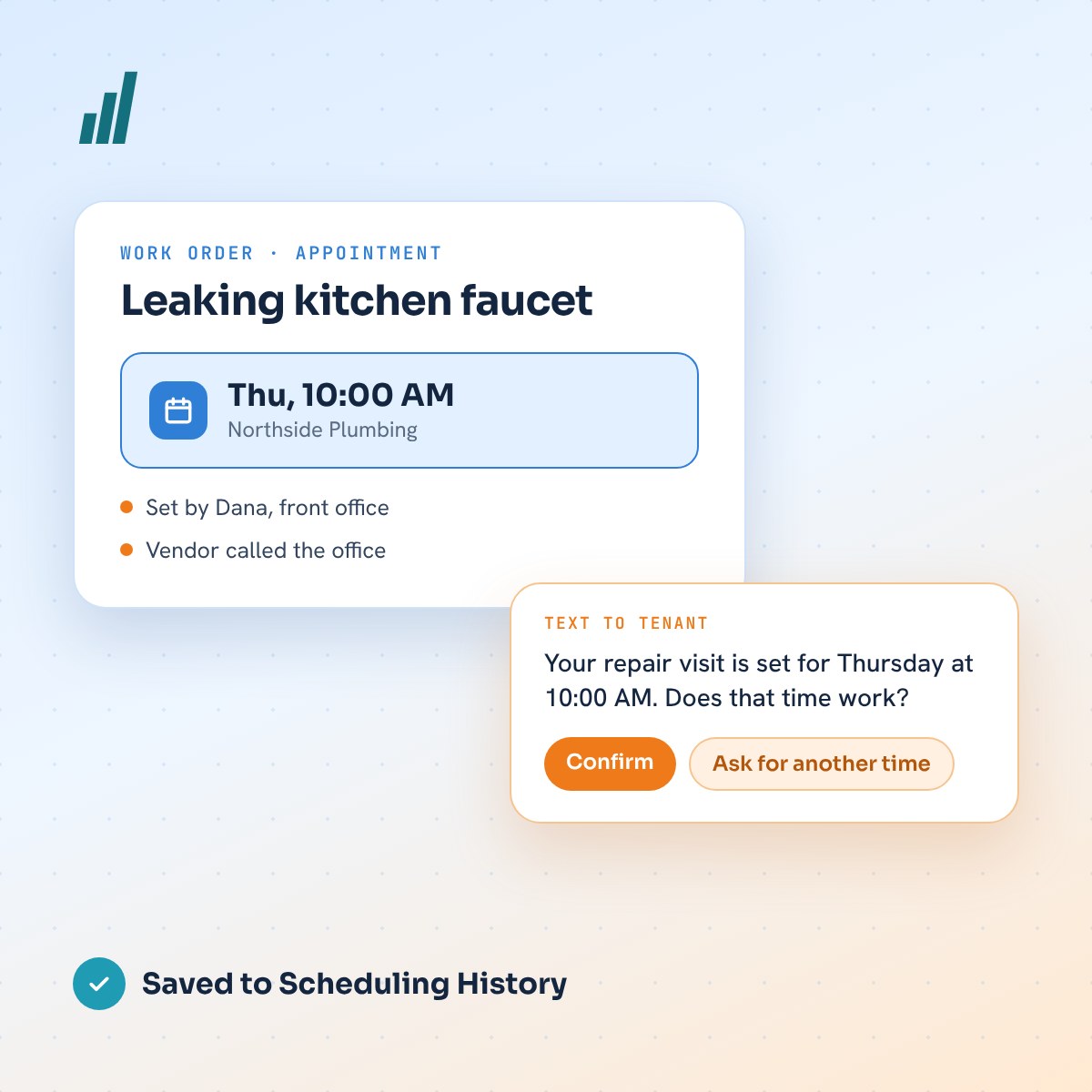
Flexible scheduling lets the property manager, or anyone on their team, set a vendor visit when the time is agreed outside the vendor portal: by phone, text, email or a call to the office. The tenant is texted and asked to confirm, the vendor gets a confirmation, and every step is saved to the work order.
Key takeaways
- In August, beta PMs told us many visit times are agreed outside the vendor portal, and the PM or a team member hears first.
- The automated vendor-and-tenant flow is unchanged and is still the main path.
- Any team member can now set, change or cancel a visit from the dashboard or the PM Portal, under their own name.
- Tenants are texted, asked to confirm, and can ask for another time. Nothing is silently assumed.
- Every visit, however it was booked, lands in one Scheduling History on the work order.
Maintenance software usually assumes the vendor will log in and offer times. Many vendors do. But plenty of visit times are still settled on a quick phone call, a text to the property manager, or a call to the front desk, and the software never hears about it.
That gap is what our beta test property managers raised in August. This update, flexible scheduling, is our answer: the automated flow stays exactly as it was, and the PM or anyone on the team can now set the visit themselves without losing the tenant updates or the record the system keeps.
What did beta property managers ask for in August?
In August, the property managers testing PMP Maintenance on real jobs gave us this feedback:
The automated flow works well when the vendor uses their portal. In day-to-day work, however, some visit times are agreed outside the portal, and the PM, or team member, is the one who hears about it.
This told us: we need more flexibility with vendor scheduling.
The ask: beta PMs asked to be able to set the visit themselves, or have a team member do it, without losing the tenant updates and the record the system keeps.
How does a visit time actually reach the office?
In eight different ways, and only one of them ran through the automated flow. Before building anything, we listed every way a visit time reaches a property management office:
- The vendor offers times in their portal (the automated path)
- The vendor calls the PM
- The vendor texts the PM
- The vendor emails
- The vendor calls the office and someone else answers
- The vendor writes the time in a portal message
- The tenant and vendor arrange it between themselves
- The PM decides the time
The first one needs no work from the office. The other seven are what flexible scheduling is built for. In each of them, the time used to live in someone's phone, inbox or sticky note until it was re-entered, and the tenant waited to hear.
What does the automated vendor flow still do?
Everything it did before. When a job is approved, the vendor accepts it and offers up to three visit times in their portal. The tenant picks one in the tenant portal, or by replying 1, 2 or 3 to our text. The visit is booked, both sides are told, and the tenant gets a reminder the day before. If the vendor hasn't offered times, they are reminded, and after two days the PM is alerted.
This is still the ideal path, and it is unchanged. It takes no time from the PM, and it keeps vendors in the habit of using their portal. Flexible scheduling sits beside it as the backup for real life, not as a replacement. It is the same idea behind our automated workflows: automate the routine, and keep a person able to step in.
How do the two scheduling paths fit together?
They start at the same approved job and end at the same booked visit. On the left of the map is the automated path. On the right is what we added: when the vendor gives the time some other way, the PM or a team member sets the visit, and the tenant is asked to confirm it.
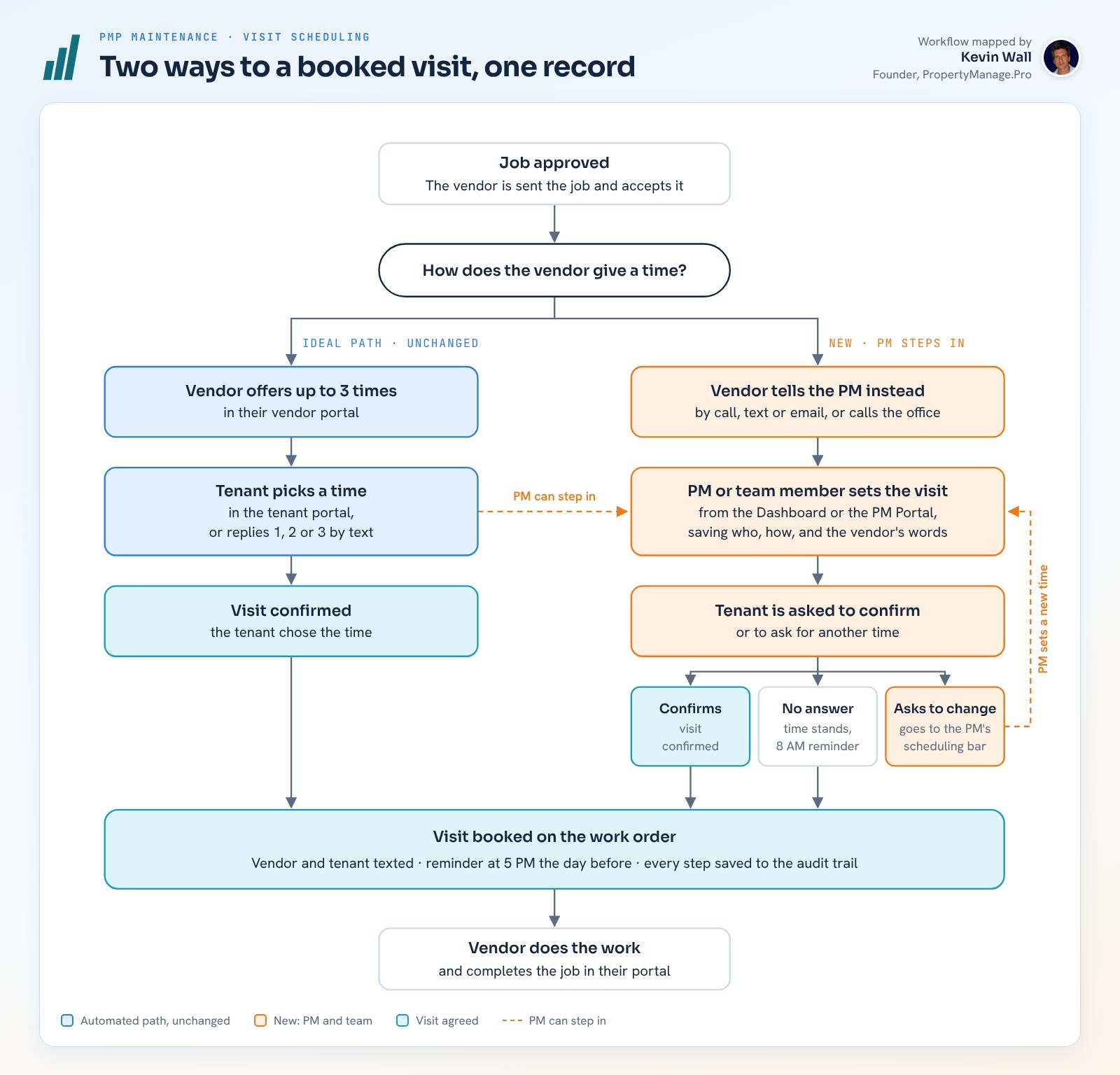
The PM can also step in on the automated path at any time, for example when a vendor offered times but then called with a better one. If the tenant asks for another time, the job goes to the PM's scheduling bar and the PM sets a new one. If the tenant doesn't answer, the time stands and they get one reminder at 8 AM.
What did we add for PMs, tenants and vendors?
Control for the property manager and the team, and the same clear experience for everyone else.
For the PM and their team
- An Appointment card on every work order in the dashboard: set, change or cancel the visit.
- A Scheduling section in the PM Portal, so the PM can do it from their phone.
- A Needs scheduling bar on the dashboard that lists the jobs waiting on a time.
- Any role (admin, manager or staff) can set a visit, and each one is recorded by name.
For tenants
- A text with the visit time and a link to confirm it.
- “Ask for another time” in their portal, for any reason. The booked time stays until it changes.
- If they don't answer, the time stands, with one reminder the next morning.
- The usual reminder at 5 PM the day before.
For vendors
- A confirmation text with the visit the PM set.
- Every text points back to their portal with the link.
- If a vendor replies to one of our texts, the reply lands on their job for the PM, and they get their portal link back.
For the record
- A Scheduling History section in the work order's audit trail.
- Every time offered to the tenant, the time they picked, who set each visit and how they heard about it.
- The vendor's own words when the PM pastes them in, and the exact text of every message sent.
What changes in each real-world situation?
The portal path stays the same. Every other situation now has a quick, recorded way in:
| Situation | Before | Now |
|---|---|---|
| Vendor schedules in their portal | Tenant picks from up to 3 times | The same, unchanged |
| Vendor calls the PM with a time | The time had to go back through the vendor portal | The PM enters it in a few taps; tenant and vendor are texted |
| Vendor texts or emails the PM | The time lived in the PM's phone or inbox | The time and the vendor's words are saved on the work order |
| The office takes the call | A note was passed to the PM | Whoever took the call sets it, under their own name |
| Tenant and vendor agreed it themselves | The system still waited for portal steps | The PM marks it “tenant arranged” and it is saved as confirmed |
| Tenant needs another time | The vendor was asked for new options | The tenant asks in their portal and the job appears on the PM's scheduling bar |
| Vendor replies to our text | The reply stayed in the text thread | The reply is saved on the job and the vendor gets their portal link back |
Why is this better for the office, tenants and vendors?
It is flexible for the office and unchanged for the automation. Six things make the difference:
- The automated path stays the default. Vendors who use their portal see no change, and every text nudges the rest back toward it.
- No job waits on one person. Anyone on the team can set a visit the moment they hear the time, from the desk or a phone.
- The tenant is always in the loop. They are told right away, asked to confirm, and can ask for a change. A visit is never silently assumed.
- One record, however it was booked. The work order, the timeline and the audit trail show the same visit, who set it and how, which helps settle any question about a missed visit.
- Problems surface on their own. The Needs scheduling bar shows jobs where the tenant asked for a change, hasn't confirmed, or the vendor hasn't offered times.
- Adoption is measurable. Every visit records where it was set, so you can see how many come through the vendor portal and coach the vendors who don't use it.
That last point matters for growing teams. Flexible scheduling shouldn't become the habit; it should catch what the portal misses while the numbers show which vendors need a nudge.
How did we build and test flexible scheduling?
The same way we approach every workflow change: start with the people using it, then prove it before anyone relies on it.
- Listen. The request came from beta property managers running real jobs, and we wrote it down in their terms: more control over scheduling, for them and their team.
- Map the real world first. We traced what the system did in each of the eight situations, which showed exactly where a PM needed a way in and where the existing flow should stay untouched.
- Agree the rules in writing. The vendor portal stays the main path; every team role can set a visit, recorded by name; the tenant can confirm or ask for a change; texts go out as soon as the time is set.
- Build it once. One shared set of scheduling rules runs behind the dashboard, the PM Portal, the tenant portal and the text line, so a visit behaves the same wherever it is set.
- Test before anyone sees it. 590 automated tests pass, including 28 written for scheduling: time zones, reminder timing and the exact wording of each text. A live test plan walks through 11 real-world scenarios with test phones for the tenant and the vendor.
- Release in stages. The database first, then the server pieces one at a time, then the screens.
Flexible scheduling is now live for our beta property managers on real jobs, and the Scheduling History shows us how visits are being booked so we can keep improving the flow. To see how jobs reach this point in the first place, read What Is AI Maintenance Triage?
Frequently asked questions
Does the vendor portal still work the same way?
Yes. When a vendor offers times in their portal, the tenant still picks one in the tenant portal or by replying 1, 2 or 3 to a text, with the same reminders as before. Flexible scheduling only adds a way for the PM or a team member to set the visit when the time arrives some other way.
Who on my team can set a vendor visit?
Any role: admin, manager or staff. Whoever sets the visit is recorded by name, along with how they heard about the time (a call, text, email, a call to the office or a portal message), so the work order always shows who booked it and why.
What happens if the tenant doesn't confirm the visit?
The time stands. The tenant gets one reminder the next morning at 8 AM and the usual reminder at 5 PM the day before. If they ask for another time in their portal, the booked time stays until it changes, and the job appears on the PM's Needs scheduling bar.
Does a confirmation text count as notice of entry?
Not on its own. Notice rules for entering a rental are set by state law. California, for example, presumes 24 hours' written notice is reasonable in most cases. The confirmation text tells the tenant the time and saves a record, but check your state's rules and your lease for how notice must be given.
Sources
Automated when it can be, flexible when it needs to be
Want maintenance that schedules itself, and lets you step in?
Book a call and we’ll walk you through how PMP Maintenance books vendor visits, keeps tenants updated and records every step.
Keep reading
Related resources

What Is AI Maintenance Triage?
An Article Brief on how PMP answers maintenance calls with AI voice agents, triages them by category and urgency, and sets up the work order.
Kevin Wall3 min read
After-Hours Maintenance Calls: How to Triage Without Burning Out Your Team
What counts as an emergency, a five-step call script, an on-call rotation people can live with, and how AI can take the first call.
Kevin Wall6 min read
Automated Workflows for Property Managers
Six PMP workflows for the long jobs: make-ready, move-in, preventive maintenance, lease renewal, rent recovery and vendor compliance.
Kevin Wall3 min read