AI for Tenant Communication: Faster Replies That Don’t Sound Like a Robot
Tenants ask the same questions every week, at every hour. AI can answer most of them in seconds, as long as it sounds like your team and knows when to hand off.

Quick answer
Use AI for the tenant messages that repeat: rent and payment questions, maintenance updates, move-in and move-out steps, and policy questions. Give it your approved answers and a short voice guide so replies sound like your team. Keep people in charge of legal notices, money decisions, screening and anything sensitive.
Key takeaways
- Most tenant messages are repeat questions, which is exactly what AI answers well.
- AI only sounds human when you give it your approved answers and a short voice guide.
- Legal notices, deposit deductions, screening decisions and disputes stay with a person.
- Start in draft mode, where a person approves every reply, then loosen it for routine questions.
- Measure first response time, repeat contacts and tenant reviews, not just messages sent.
“When is rent due?” “Did you get my maintenance request?” “Where do I leave the keys at move-out?” Your team answers the same questions every week, by text, email, portal and phone, and many of them arrive after hours.
AI can answer most of those in seconds. Done badly, it sounds like a robot and frustrates tenants. Done well, tenants get faster, clearer answers and your team gets hours back. This guide follows on from How to Use AI to Save Time in Property Management and focuses on one job: talking to tenants.
Where does tenant communication eat the most time?
In the repeat questions, not the hard conversations. A property manager’s inbox is full of the same handful of questions, asked a little differently each time, across several channels.
- Rent: when it’s due, how to pay, whether a payment went through, late fees.
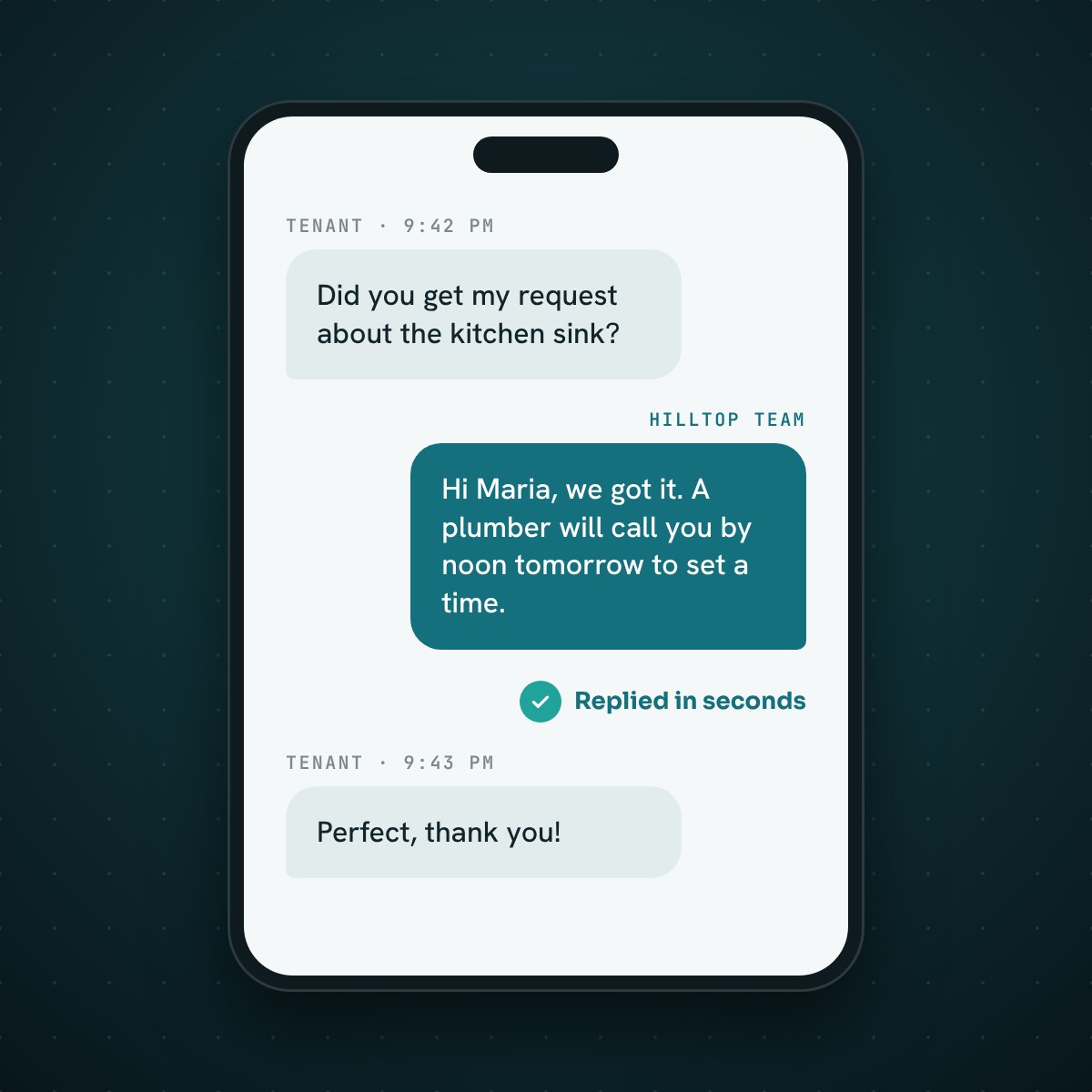
- Maintenance: “did you get my request?” and “when is someone coming?”
- Move-in and move-out: keys, utilities, inspections and deposits.
- Policies: pets, parking, guests, trash days, noise.
- Renewals: dates, options and what happens next.
Each one is quick to answer. Together they fill hours every week and pull your team away from the work only people can do.
Which tenant messages can AI handle well?
Messages with a clear, approved answer that doesn’t change from tenant to tenant. Use this table to split the work between AI and your team:
| Message type | What AI does | What a person does |
|---|---|---|
| Rent and payment questions | Answers due dates, payment options and portal steps | Handles payment plans and disputes |
| Maintenance requests | Takes the details and photos, sorts urgency, confirms next steps | Approves costs and handles emergencies |
| Status updates | Tells the tenant where their request stands and when to expect a visit | Steps in when a job is late or stuck |
| Move-in and move-out | Sends checklists, key and utility instructions, reminders | Inspections, deposit decisions |
| Policy questions | Answers from your written policies and lease | Exceptions and judgment calls |
| Renewals | Sends reminders and explains the options | Rent decisions and negotiations |
How do you keep AI replies from sounding like a robot?
Give it your words, your rules and a short voice guide, then read what it writes. Robotic replies come from AI guessing. Human-sounding replies come from AI working from your real answers.
- Use the tenant’s first name and answer the question in the first sentence.
- Write short: two to four sentences for most replies.
- Plain words: no “per our policy” or “please be advised.”
- Say what happens next, with a time: “A technician will call you by noon tomorrow.”
- Sign off as a person or team, not as “the system.”
What should AI never send to a tenant on its own?
Anything with legal, financial or fair housing weight. AI can draft these for a person to review, but it shouldn’t send them by itself:
- Legal notices: late-rent, entry, lease violation, non-renewal or eviction notices.
- Money decisions: deposit deductions, fee waivers, payment plans and rent changes.
- Screening and approvals: application decisions and anything about who can rent. The Fair Housing Act applies to your decisions and your messages, whether a person or a tool wrote them.
- Disputes and complaints about neighbors, staff or discrimination.
- Emergencies: anything about fire, gas, flooding or safety goes to a person right away. See After-Hours Maintenance Calls for a triage flow.
Keep tenant data to what each reply needs. Never paste Social Security numbers, bank details or screening reports into a general AI tool.
How do you set up AI for tenant communication?
Start small, in draft mode, with the questions you answer most.
1. List your top 20 tenant questions
Pull a month of texts and emails and count them. You’ll likely find a small set of questions makes up most of the volume.
2. Write one approved answer for each
Use your lease and policies. These answers become the AI’s source of truth, so keep them current when a policy changes.
3. Write a one-page voice guide
Include the five rules above, two or three example replies you like, and words your team never uses.
4. Run in draft mode for two weeks
AI drafts every reply and a person approves, edits or rejects it. Fix the answers that need editing most often.
5. Let routine answers send, keep the rest in review
Once the drafts hold up, let simple questions like rent due dates and portal steps go out on their own. Everything on the never-alone list stays in review.
How does PMP handle tenant communication?
PMP answers the tenant messages that tie up your team most: maintenance. PMP Maintenance answers tenant calls and texts 24/7, sorts each request by category and urgency, opens the work order and keeps the tenant updated, while a property manager approves any spending.
Voice Copilot turns a note you say after a tenant call into a filed record, and routes tenant and vendor notes to the maintenance hand-off queue. Inbox Copilot, which sorts and drafts replies to your email for approval, is coming soon.
How do you know AI tenant communication is working?
Track a few numbers before you start and every month after.
- First response time, during business hours and after hours.
- Repeat contacts: tenants asking the same question twice.
- Share of AI drafts approved without edits.
- Tenant reviews and complaints that mention communication.
- Hours your team spends on tenant messages each week.
If response time drops, repeat contacts fall and reviews mention fast answers, it’s working. If tenants keep asking to talk to a person, tighten the answers or the hand-off rules.
Frequently asked questions
Will tenants know they’re talking to AI?
Be open about it. A short line like “I’m the Hilltop assistant; a team member will step in for anything I can’t answer” sets the right expectation. Some states have rules about disclosing automated messages, so check yours.
Can AI send late-rent or eviction notices?
It shouldn’t send them on its own. Legal notices have strict content and delivery rules that vary by state, so a person should review and send them. AI can help prepare a draft for that review.
What tenant messages should I automate first?
Start with the questions you answer most and that have one correct answer, such as rent due dates, payment portal steps and maintenance request status. Keep money decisions and legal notices with a person.
Does AI tenant communication replace my leasing or maintenance coordinator?
No. It takes the repeat questions so your coordinator can focus on the work that needs judgment: vendors, owners, disputes and emergencies. That time is what lets a team manage more doors without adding staff.
Sources
Faster answers, fewer interruptions
Want tenants answered in seconds, without losing your voice?
Book a call and we’ll map your top tenant questions and show you which ones PMP can answer for you.
Keep reading
Related resources
How to Use AI to Save Time in Property Management (With Prompts)
The tasks to hand to an AI assistant first, a five-part prompt recipe, six prompts you can copy today, and what never to paste in.
Kevin Wall7 min read
After-Hours Maintenance Calls: How to Triage Without Burning Out Your Team
What counts as an emergency, a five-step call script, an on-call rotation people can live with, and how AI can take the first call.
Kevin Wall6 min read
Automation To Save Time (For Property Managers)
An Article Brief on PMP Voice Copilot: say what happened after a call, check what it heard, and one tap files the note, task or lead.
Kevin Wall2 min read