How to Use AI to Save Time in Property Management (With Prompts)
You don’t need new software to start. Here are the tasks to hand to an AI assistant first, a simple recipe for prompts that work, and six you can copy today.


Quick answer
Start with the writing you do every day: owner updates, tenant replies, listing descriptions, vendor scopes and call notes. Paste the facts into an AI assistant with a clear prompt: who it is, the task, the context, the format and your rules. Then read, fix and send. Keep tenant financial data out, and you make every decision.
Key takeaways
- Start with repetitive writing, not decisions: owner updates, tenant replies, listings, vendor scopes and call notes.
- A good prompt has five parts: role, task, context, format and rules. The context is where the time savings come from.
- Always read before you send. AI drafts, sorts and summarizes; you decide and you sign.
- Never paste Social Security numbers, bank details or full rental applications into a general AI tool.
- Time one task before and after for two weeks. That’s your real number, not a vendor’s.
Most property managers who try AI open a chat window, type “write an email to an owner,” get something generic and close the tab. The tool isn’t the problem. The prompt is.
This guide is the practical follow-up to AI for Property Management: How It Saves You Time and Money. That article covers where the hours go. This one shows how to win some of them back this week, with any AI assistant you already have access to.
What do you need to start using AI to save time?
An AI assistant, a business account and fifteen minutes. ChatGPT, Claude, Gemini and Microsoft Copilot all handle the tasks in this guide. Pick the one your team will actually open, and use a business or team plan so you control how your data is handled.
You don’t need to connect it to your property management software to start. Copy the facts in, get a draft out, and paste the result where it belongs. Once you know which tasks are worth it, you can decide what to automate properly.
You won’t be early. In the Buildium and NARPM 2026 industry report, 58% of property management companies said they use AI, up from 20% a year earlier. Only 8% had fully automated a workflow. Most are still at the copy-and-paste stage, and that’s where the quick wins are.
Which tasks should you hand to AI first?
Start with writing you do every day that follows a pattern. AI is good at turning rough facts into a clear draft. It isn’t good at knowing facts it wasn’t given, so the tasks below all start with information you already have.
| Task | What you give the AI | What you still check |
|---|---|---|
| Owner update emails | Work order notes, photos described, costs, next steps | Every number and date |
| Tenant replies | The tenant’s message, your policy, the answer | Tone, and that the answer matches the lease |
| Listing descriptions | Beds, baths, features, neighborhood facts | Fair Housing language, accuracy |
| Vendor scopes of work | The problem, the address, access notes, budget limit | Scope and the not-to-exceed amount |
| Call and meeting notes | Your rough notes or a dictated summary | Names, dates and who owns each task |
| Review responses | The review text and what actually happened | Nothing private about the tenant is mentioned |
Notice what’s missing: screening decisions, rent pricing, legal notices and anything you would sign. Those stay with you. AI can help you prepare for them, but not make them.
How do you write a prompt that gets a usable answer?
Give it five things: a role, a task, the context, the format and your rules. Most weak answers come from a prompt with only the task in it.
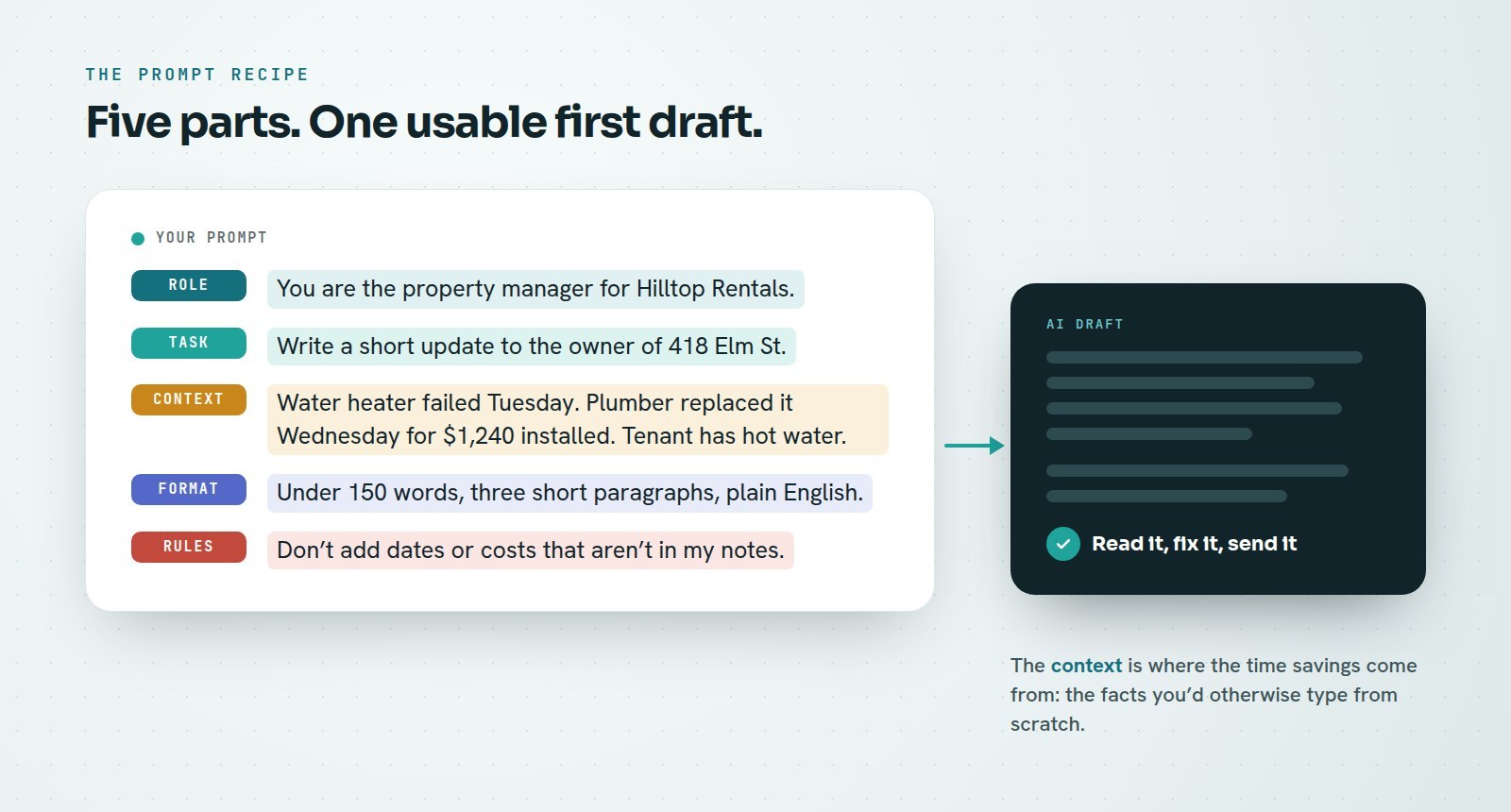
- Role: who the AI is writing as. “You are the property manager for Hilltop Rentals.”
- Task: the one thing you want. “Write an update to the owner.”
- Context: the facts, pasted in. Work order notes, dates, costs, the owner’s last question.
- Format: length and shape. “Under 150 words, three short paragraphs, plain English.”
- Rules: what it must not do. “Don’t promise dates I haven’t given you. Don’t guess at costs.”
Save your best prompts in a shared document so the whole team uses the same ones. A prompt that works is a small piece of process, and it should be treated like one.
What AI prompts can property managers copy today?
Six prompts that cover most of a week’s routine writing. Replace the parts in brackets, paste your facts after the prompt, and read the draft before it goes anywhere.
1. The owner update
2. The tenant reply
3. The listing description
4. The vendor scope of work
5. Call notes into tasks
6. The review response
What should you never paste into an AI tool?
Anything you would be uncomfortable seeing in someone else’s inbox. A general AI assistant isn’t your property management system, and it shouldn’t hold your tenants’ most sensitive data.
- Never paste: Social Security numbers, bank or card details, full rental applications, background or credit reports, or passwords.
- Trim before you paste: use the unit and first name, or “the tenant,” instead of a full name and contact details when the draft doesn’t need them.
- Don’t let it decide: screening, approvals, rent increases and legal notices. The Fair Housing Act applies to your decisions and your ads whether a person or a tool wrote them.
The FTC’s guide to protecting personal information puts it simply: keep only what you need, and protect what you keep. That’s a good rule for every prompt.
When should you go beyond copy-and-paste AI?
When the same task shows up dozens of times a week, the copy-and-paste step becomes the bottleneck. That’s the point where AI should live inside the workflow, not in a separate tab.
Time one task for two weeks before you change anything, then two weeks after. If a routine owner update drops from fifteen minutes to four, you’ll know exactly what the tool is worth to your team, and which task to automate next.
That’s what PMP builds. PMP Maintenance answers and sorts maintenance requests. Voice Copilot turns a spoken note into a filed CRM record. Workflows run turnovers, renewals and vendor compliance step by step. In each one, AI does the drafting and sorting, and a person still approves.
Frequently asked questions
Which AI tool is best for property managers?
For the tasks in this guide, the major assistants (ChatGPT, Claude, Gemini and Microsoft Copilot) all work well. Choose the one your team will use every day, on a business plan that lets you control how your data is handled.
Is it safe to use ChatGPT with tenant information?
Keep it to what the draft needs. Never paste Social Security numbers, bank details, full applications or screening reports into a general AI tool. Use first names or unit numbers, and check your plan’s data settings.
Can AI write my listing descriptions?
Yes, from the facts you give it. Ask it to describe the property, not the ideal tenant, and read every listing for Fair Housing language before it goes live. You’re responsible for the ad either way.
How much time can AI save a property manager?
It depends on your volume and how routine the task is. Time one task, such as owner updates, for two weeks before and two weeks after. That gives you your own number instead of a vendor’s estimate.
Sources
Ready for the next step
Want AI working inside your day, not in another tab?
Book a call and we’ll pick the one weekly task that would save your team the most time, and show you how PMP automates it.
Keep reading
Related resources
AI for Property Management: How It Saves You Time and Money
Where AI actually saves hours in a property management company, what to automate first, where people stay in charge, and how to measure the savings.
Kevin Wall7 min read
Automation To Save Time (For Property Managers)
An Article Brief on PMP Voice Copilot: say what happened after a call, check what it heard, and one tap files the note, task or lead.
Kevin Wall2 min read
After-Hours Maintenance Calls: How to Triage Without Burning Out Your Team
What counts as an emergency, a five-step call script, an on-call rotation people can live with, and how AI can take the first call.
Kevin Wall6 min read